This is a continuation of the previous post on Sega CD issues.
Where that post described two bugs caused by bad emulation of the CD-ROM hardware, this one describes several bugs that were completely unrelated to CD-ROM emulation.
(This post was mostly finished months ago but I didn’t want to upload it before publishing a release tag that fixed one of the Snatcher bugs described below.)
Snatcher Doesn’t Quite Work Yet
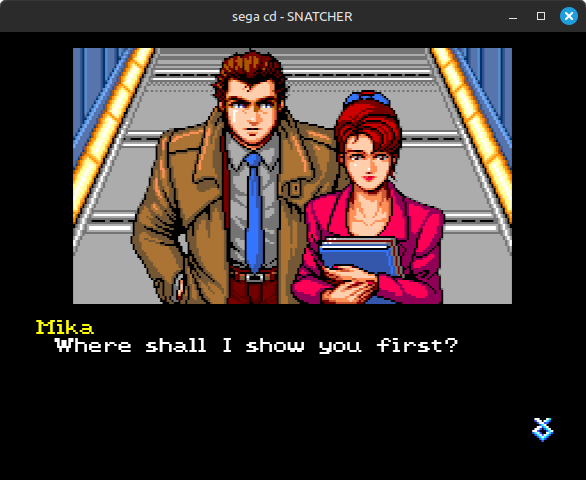
Snatcher now boots in-game, but there’s a big problem: sprites don’t display properly.
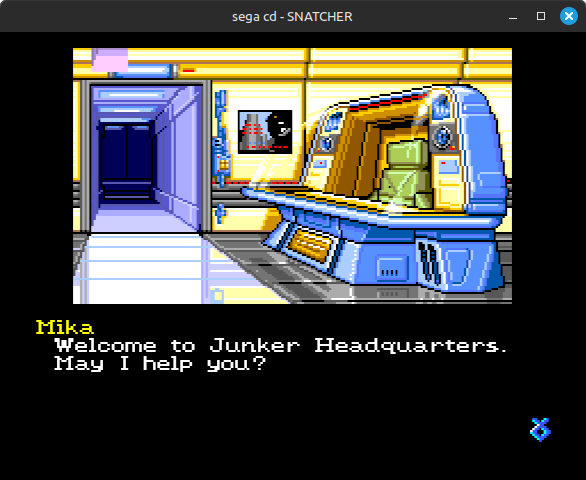 Where's Mika? And the door?
This was actually caused by a bug in my Genesis code, nothing specific to Sega CD.
Unlike Nintendo’s consoles, the Genesis stores its sprite attribute table in VRAM rather than having any dedicated object attribute memory (OAM). However, the video processor doesn’t always read the sprite attributes directly from VRAM: it reads the first 2 words of each 4-word sprite table entry from a write-through cache so that it can perform some parts of sprite processing in parallel to VRAM fetches for rendering.
The cached words contain the sprite Y coordinate, the sprite size (from 8x8 pixels to 32x32), and “link data” which is the index of the next sprite table entry to process (the VDP processes sprites in a linked list ordering rather than physical table ordering). This allows the VDP to scan for which sprites vertically overlap any given line without needing to read from VRAM.
The cache is not just an implementation detail that an emulator can ignore! Because the cache is write-through, changing the sprite table address does not immediately change any cached sprite attributes - they only change when software writes to those attributes at their new VRAM addresses. Castlevania: Bloodlines somewhat infamously relies on this for the reflection effect in Stage 2. Not to mention Overdrive 2’s crazy textured cube effect.
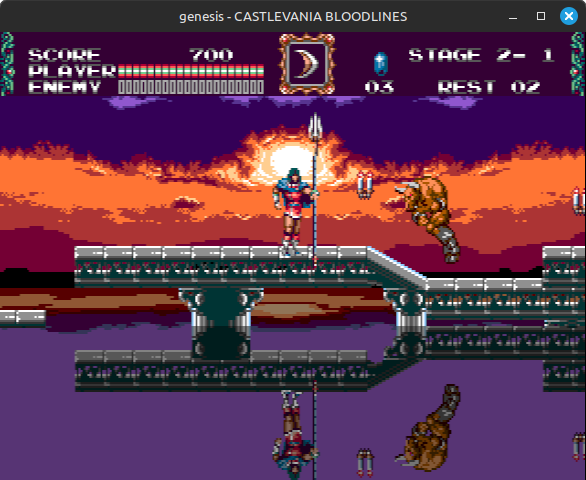 Water reflection effect in Castlevania: Bloodlines
I had a small problem in my logic for updating the write-through cache (simplified):
|
|
Snatcher uses H32 mode and it sets the sprite attribute table address to $FE00. In H40 mode that address would get masked to $FC00, but in H32 mode it remains at $FE00. The H32 sprite attribute table size is 512 bytes (0x200).
0xFE00 + 0x200 is…integer overflow! If you’re using u16 instead of u32, like I was here. That produces a range where the start value is greater than the end value, i.e. an empty range, so the cache was never getting updated.
Integer overflow here is impossible in H40 mode, which most games use, because H40 mode forcibly aligns the sprite table address to a 1024-byte boundary while the table is only 640 bytes. My guess is that Snatcher uses H32 mode because that made it easier to reuse graphical assets from the earlier PC Engine CD version of the game.
Rust’s dev profile by default panics on integer overflow, so if I had ever run this with the dev profile then I would have figured this out immediately, but at the time I never tested with the dev profile because compiling Rust with no optimizations produces an unusably slow binary. I now primarily test with a custom profile that extends the default dev profile with a few tweaks to improve incremental compilation times, and very importantly I also set opt-level=1 so that the emulator can actually run at full speed when emulating anything more complex than Sega Master System / Game Gear.
Fixing this fixed the missing sprites!
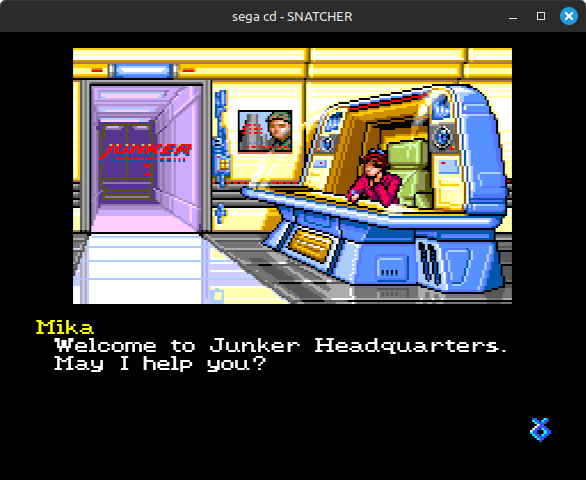
However…
Snatcher Still Doesn’t Quite Work Yet
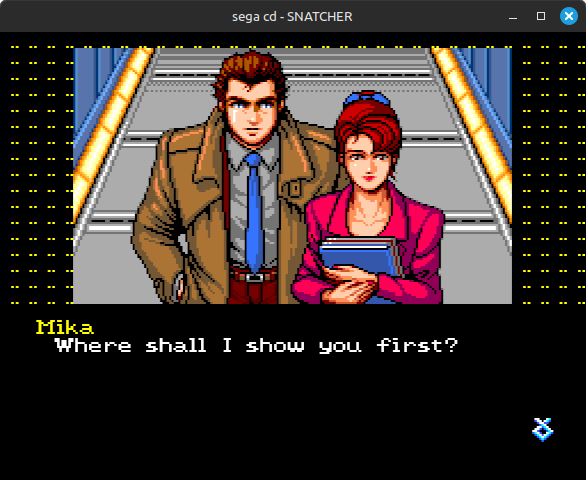
I’m not entirely clear on the hardware reasons for this, but when software runs a VDP DMA that reads from Sega CD word RAM, all VDP DMA reads are effectively delayed by a cycle. Sega’s documentation says this happens because VDP DMA read-outs are slow. I guess it’s a timing issue between VDP DMA putting the word RAM address on the address bus, word RAM putting data on the data bus, and VDP DMA reading from the data bus.
I had a hard time understanding what exactly this means without an example, so let’s say that you want to copy some data from $210000 in word RAM to $1000 in VRAM. You’d initialize the DMA source address to $210002 instead of $210000 because of the delay. You’d still set the VDP data port address (DMA destination) to $1000.
Once DMA starts, the first VDP DMA read will get an undefined value, the second read will get the data at $210002, the third will get $210004, and so on. After the DMA finishes, you need to manually copy a single word from $210000 in word RAM to $1000 in VRAM, replacing the undefined value.
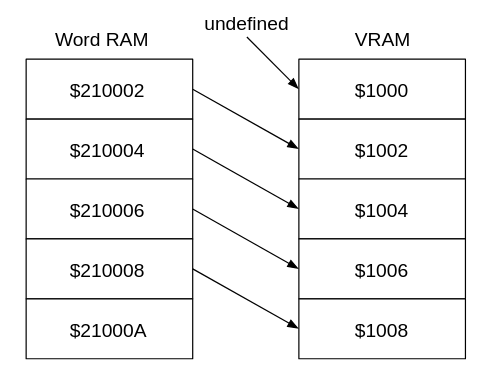 VDP DMA with source address $210002 and destination address $1000
The SVP coprocessor (Sega Virtua Processor) used in the Genesis version of Virtua Racing has a nearly identical issue when VDP DMA reads from the SVP cartridge, so this isn’t totally unique to Sega CD.
I originally implemented this very naively by just returning the data at address - 2 if the read was from VDP DMA and the address was in the word RAM range ($200000-$23FFFF):
|
|
The problem here is that because of the delay, VDP DMA reading from $240000 should return the data at $23FFFE, the very last word in word RAM.
Snatcher depends on this because it runs VDP DMAs that read all the way to the end of word RAM. The above graphical corruption is caused by the DMA’s final read getting the wrong value, corrupting the last 4 pixels in the 8x8 tile that the game displays around the central image.
That should be:
|
|
This fixed Snatcher at the time…but only because of an inaccuracy in how I emulated VDP DMA source address increments. Snatcher broke again much later once I fixed that.
On actual hardware, the VDP DMA source address always wraps within the same 128 KB block. This means that when a VDP DMA reads all the way to the end of word RAM, the source address wraps from $23FFFE to $220000 before the final read. With this behavior emulated, the above implementation gives that final read the word at $21FFFE instead of the word at $23FFFE like it’s supposed to.
My final implementation of the delay was to simply implement it as, well, a delay. VDP DMA reads from word RAM always return whatever is on the data bus, before word RAM updates the data bus with the requested word:
|
|
This finally fully fixed Snatcher!
Test And Set
Now for the Batman Returns bug that I mentioned at the end of the previous post.
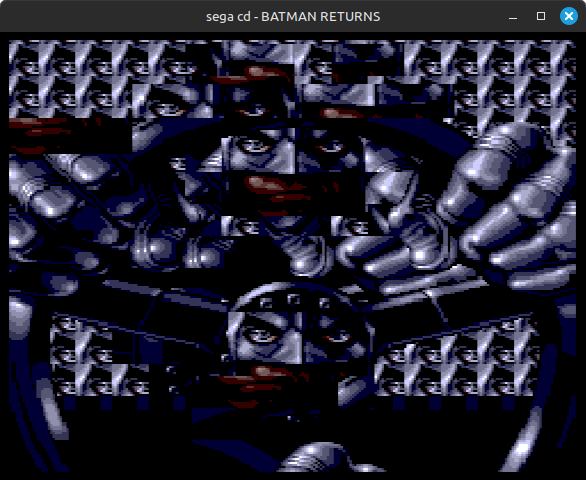 Batman has eyes everywhere
This bug took me quite a long time to solve. My intuition was way off on where the cause might be.
The Sega CD has a “graphics” chip that can perform affine transformations on bitmap image data in word RAM. This enables the same sorts of rotation and scaling effects as SNES Mode 7, but on arbitrary graphical data rather than being limited to backgrounds. The chip also supports using different affine transformation parameters for each line in the output image, making perspective effects possible (on SNES these require using HDMA to change the Mode 7 parameters after each line).
The big downside to this chip is that because it’s part of an add-on rather than directly connected to the Genesis video hardware, after each transformation finishes, games must copy the transformed images from Sega CD word RAM to Genesis VRAM for display. This is very likely to run into VRAM bandwidth limitations, especially when transforming larger images such as background graphics. Games that use the affine transformation chip generally don’t manage to update their graphics at a full 60 frames per second, instead effectively duplicating the previous frame if the next frame’s graphics aren’t ready in time.
Batman Returns uses this chip very heavily, so naturally I assumed that the problem must be in my emulation of that chip. Nope!
Well…could it be something related to word RAM handoffs, since the hardware handoff logic is a bit complex? Also nope!
At this point I slapped together a very basic visualizer to let me see exactly what images the game was writing into word RAM, both original and transformed. I used the BIOS startup animation to confirm that this debug view kind of worked:

I’m displaying in monochrome because there’s no real color information here, only a 4-bit palette index for each pixel. I could have done a palette lookup in Genesis CRAM but that wasn’t necessary for what I wanted to see.
I kept an eye on this view while Batman Returns booted and noticed something interesting: it would write some of the correct source graphics into word RAM, but then it would very quickly overwrite them with other graphics before it started rendering anything to the screen.
For example, here you can see part of the title screen text in word RAM:
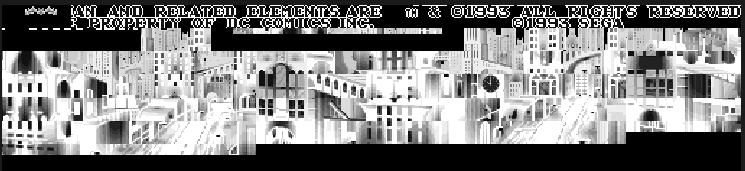
The game very quickly overwrote the text graphics with the Batman logo:

That caused the title screen to look like this, where everything that should be text is replaced with garbage versions of the Batman logo:
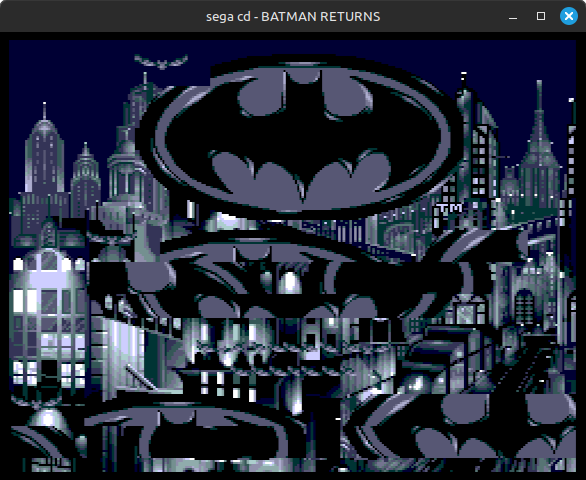
While not completely conclusive, this made me think that the problem was something in how the game writes the source image data to word RAM, before it even runs any affine transformations.
I started looking at disassembly trace logs surrounding when the game writes to some of these word RAM addresses, to try and figure out why it was doing this. I wasn’t sure what exactly I was looking for, but once I saw the culprit I immediately knew what the problem was:
00C9C0    add.w #1, d0
00C9C2    tas (a4)+
00C9C4    bne -6  ;$00C9C0
00C9C6    move.w d0, (a5)+
00C9C8    dbf d7, -10  ;$00C9C0
00C9C0    add.w #1, d0
00C9C2    tas (a4)+
00C9C4    bne -6  ;$00C9C0
00C9C6    move.w d0, (a5)+
00C9C8    dbf d7, -10  ;$00C9C0
00C9C0    add.w #1, d0
...
There it is:
tas (a4)+
TAS instructions!!
The 68000 TAS instruction (test and set) is unique in that it locks the bus for the duration of the instruction. It performs a read-modify-write operation while the bus is locked to ensure that no other devices can access the same memory address between the read and the write. It’s intended for things like implementing semaphores in a multi-processor environment.
It specifically does the following: it reads a byte from memory, sets the CPU’s zero and negative flags based on the byte read (same as a TST.B instruction), then writes back the same byte but with the highest bit set to 1. If the highest bit was already 1, it will end up writing back the same value, and it will set the CPU flags to Z=0 and N=1.
On the Genesis, the 68000 main CPU is not able to lock the bus, so the TAS instruction never writes to memory. It only performs the “test” part of “test and set”, making it functionally equivalent to a TST.B instruction. There’s at least one game that depends on this behavior: Gargoyles crashes upon starting the game if TAS instructions write to memory.
The Sega CD’s sub CPU can lock the bus, so TAS works as intended on the sub CPU. Batman Returns here appears to be using TAS to check which slots in word RAM are already occupied with image data, relying on the “set” part of TAS to mark the first empty slot that it finds.
I was not emulating TAS working as intended on the sub CPU. D’oh.
I already had a flag in my 68000 implementation for whether to allow TAS instructions to write to memory, so I tested setting that for the sub CPU (but leaving it off for the main CPU), and that fixed everything.
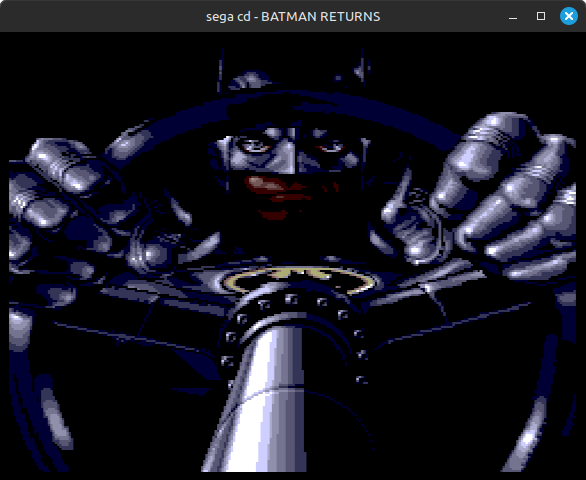
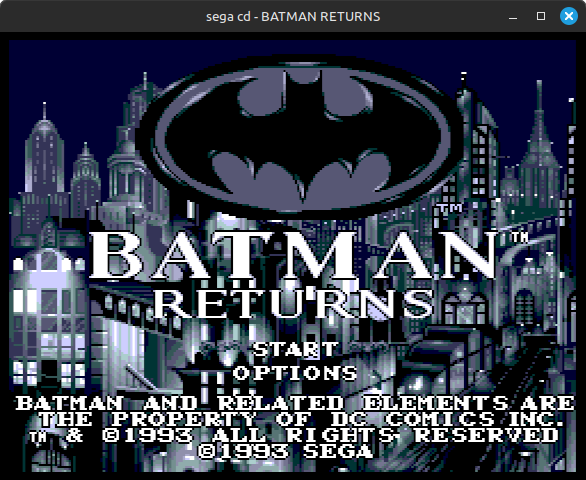
Well…not everything.
Even More Freezing
Batman Returns now runs with correct graphics!
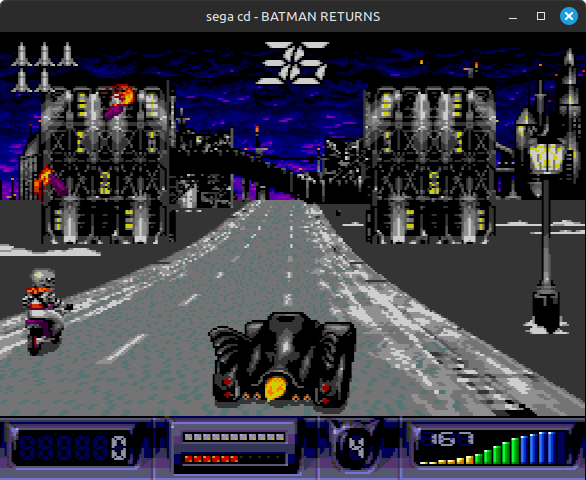
But…it randomly freezes during gameplay, usually within 10-15 seconds.
I immediately ruled out CD-ROM emulation as a possible cause, at least. The game plays CD audio tracks during gameplay, so it can’t read data from the disc without interrupting the music.
Based on an execution trace around the freeze, the main symptom was obvious: a divide by zero exception on the sub CPU.
When software executes DIVS (divide signed) or DIVU (divide unsigned) with a divisor of zero, the 68000 triggers a divide by zero exception. There’s at least one game that relies on this behavior (After Burner Complete on 32X), but Batman Returns clearly does not expect this exception to ever occur. The sub CPU’s divide by zero exception handler immediately jumps to a non-code address and never recovers, causing the game to freeze.
Solving this required tracing backwards to figure out where the zero came from, while paying close attention to branches taken and not taken. I eventually found this:
|
|
It performs two consecutive divisions, and if either quotient is 0 then it replaces that quotient with a 1, presumably to avoid dividing by 0 later. However, in my emulator those BNE branches were always taken, even if the quotient was 0!
Yep, I was not correctly setting the CPU’s zero flag in DIVS and DIVU instructions.
DIVS and DIVU both divide a 32-bit dividend (second operand) by a 16-bit divisor (first operand), producing a 16-bit quotient and a 16-bit remainder. They write the combined quotient and remainder to the dividend register as a single 32-bit value, with the quotient in the lower 16 bits and the remainder in the upper 16 bits.
They’re supposed to set the zero flag based only on the 16-bit quotient, but I was setting it based on this full 32-bit value, so the zero flag would only get set if the quotient and remainder were both 0. In other words, only if the dividend was 0.
Fixing DIVS/DIVU zero flag behavior fixed the freezing, which was thankfully the last Batman Returns bug I encountered!
I was a little surprised this never caused problems in any Genesis game that I tested, but then again, games generally avoid division instructions because they are extremely slow. DIVS can take more than 150 cycles! This is somewhat less of an issue on Sega CD where games can offload expensive computations to the sub CPU.
To Be Continued?
There’ll probably be one more of these. I at least want to cover Silpheed’s racy word RAM handoff code after how much grief it’s given me…